
I’m always moving.
Dog walk at 6am and an idea hits on the trail. Beers with someone and three things worth remembering come up. Grabbing a margarita and I suddenly need to pull up something I wrote two weeks ago because it’s directly relevant to this conversation right now. Out on a bike ride, I photograph a bird I’ve never seen and want to loop back to it later.
My brain works in threads and connections. Ideas arrive sideways, mid-stride, uninvited. One thing hooks to another thing from three weeks ago and suddenly there’s something worth chasing.
Music. Writing. A bunch of work projects. The ideas and action items and half-formed thoughts are arriving constantly.
Not neat sequential tasks.
For years I ran everything through Apple Notes and a series of notebooks. Never lost my way but I lost a lot of good stuff that way.
I switched to Notion and built a real organizational system. A home for all of it. Projects, ideas, content in progress, things I’m tracking. Everything has a place. Same idea I had with Apple Notes and the Leuchtturm 1917 notebooks that colored the walls of my earlier years. A place for things. Somewhere for the ideas to land.
Here’s what building a system like that doesn’t tell you.
Maintaining it is harder than building it.
Maintenance is always the tricky part. It sneaks up on you. The clanking sound of a system that resists you is the thing that puts it to bed.
You have to remember to log things, keep the structure current, actually find stuff when you need it. Life moves faster than friction allows.
That changed when I started running Claude directly inside Notion.
Not a chatbot in another tab giving me steps to follow. An actual operator with a live read/write connection to my workspace.
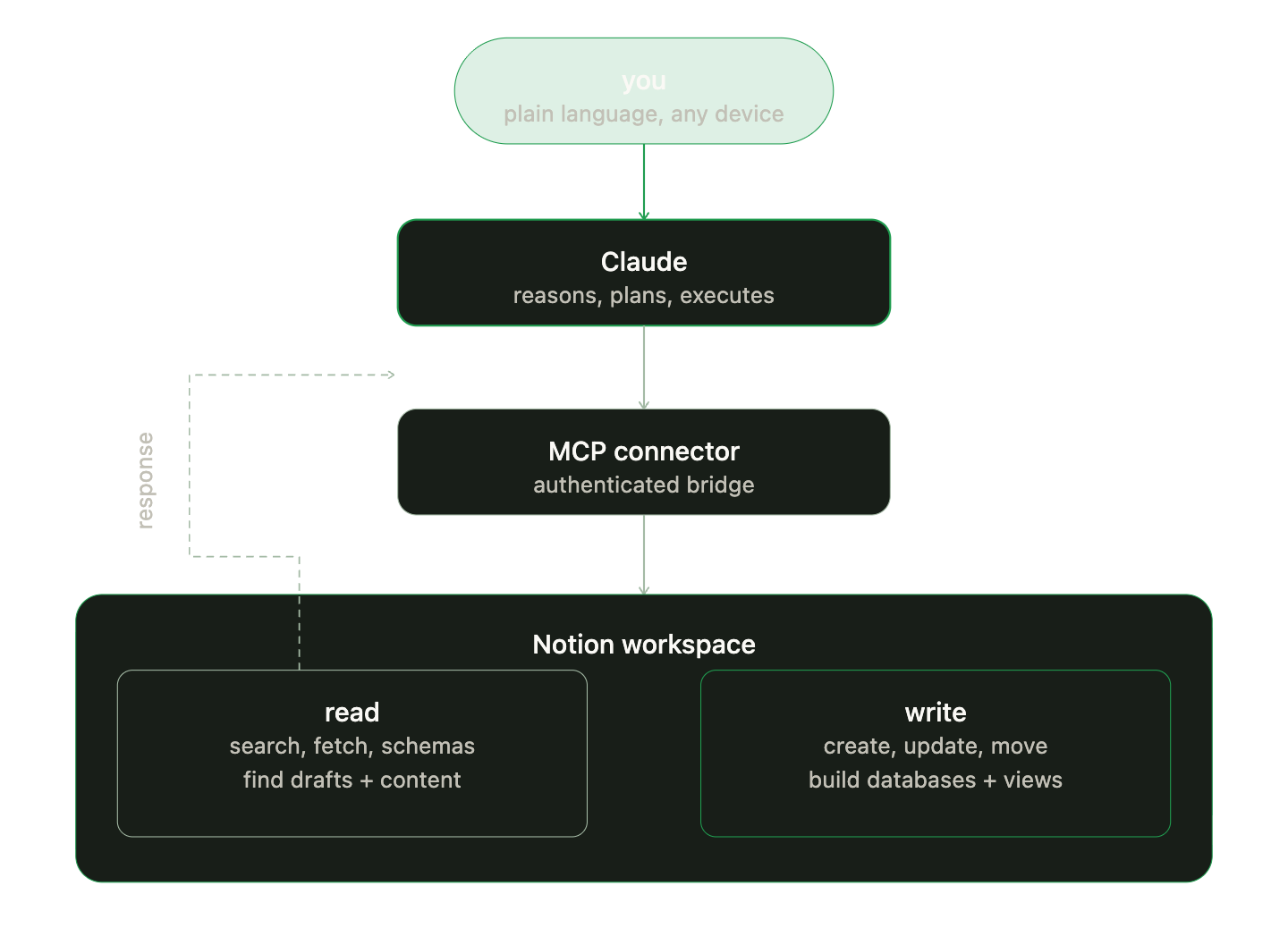
Claude connected to Notion via MCP: a live read/write integration, not a copy-paste workflow
How it actually works
The connection runs on an MCP, Model Context Protocol. It’s a standardized way for Claude to connect to external tools as a live integration, not a copy-paste workflow. When Claude is connected to Notion via MCP, it doesn’t just answer questions about Notion. It operates inside it.
Let’s dial in and then dial down that complexity real quick.
Setting it up this way, you give Claude glasses so Claude can read: search across everything, fetch the full content and structure of any page or database, understand how the data is organized.
Claude searching and reading across a Notion workspace
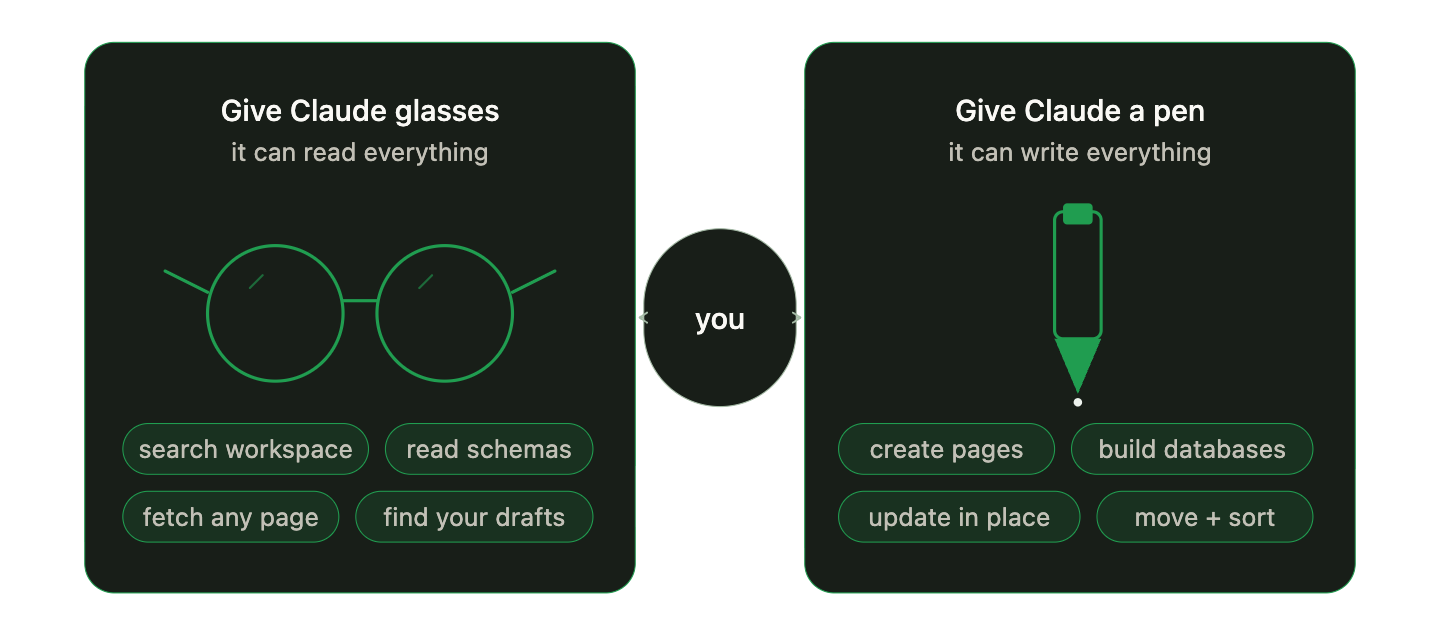
Taking it a step further, give it a pen so Claude can write: create pages with proper database properties set, build entirely new databases from scratch with custom schemas, update content inside existing pages, flip status fields and dates, create new views, move pages, add comments.
The human is the only input that matters. That means me on a run, feeling my most human. I describe what I need in plain language, Claude finds where it lives or builds what’s needed and it executes.
What reduces the friction is that Claude is not guessing at my workspace structure or handing me a template to paste in. It’s reading the actual schema, building things that fit how my data is already organized and maintaining it over time.
What it looks like in practice
Setting the scene: A dog walk on a sunny Colorado morning.
On the dog walk, idea hits.
Something about Cara Cara oranges and hybrid functionality. Love a good citrus and origin story.
I open Claude on my phone, describe it in a sentence. It goes where it belongs, structured, with the right properties set.
Curtain drop, next scene: Mid-conversation at the brewery on one of those spring days where you feel eternal and inspired. Call it a Saturday.
Someone asks about a post I was working on.
Why do you keep referencing Cara Cara oranges?
I ask Claude to find it. It pulls up the draft in seconds, tells me exactly where it lives, gives me the link. I’m back in the conversation in thirty seconds.
You see, Cara Cara oranges were accidental. Now we revel in the mistake of coincidence!
Starting a new project, I don’t spend twenty minutes building out the page structure. I describe the project and what I need to track. Claude reads my existing project database, builds the page to match the schema, fills in the properties. I’m working on the actual project, not the system that holds it. The lack of friction lets the system fade into the background like a song you forgot was playing.
Three weeks later, something in that project changes. I tell Claude. It updates the page in place, the right section, the right properties. I don’t have to hunt for it.
The system stays current because the friction of keeping it current is almost zero.
Why this matters beyond productivity
Kyle and Sierra at the Flatirons, Boulder Colorado

This isn’t to say that I think everyone needs a complex Notion setup. I’m writing it because the gap between having a system and actually using your system is almost always friction, not intention.
Most people who’ve tried Notion and let it go weren’t lazy or disorganized. They just didn’t have a way to keep the system moving at the same speed they move. When upkeep requires deliberate effort, the fast-moving parts of life always win.
Claude running inside Notion closes that gap. The system stays current because the work of maintaining it happens in the same conversation where you’re already thinking.
I’m still moving fast. The ideas still hit at inconvenient times. I had a Cara Cara orange while watching a house finch sing and felt the magic.
The magic still comes when it wants to.
Now there’s a place for all of it.
And it stays organized whether I’m paying attention or not.
I’m writing the full breakdown next: the setup, what breaks, the prompts I actually use. Subscribe so you catch it when it lands.
If you’re thinking about why prompt structure matters more than tone, I wrote about that too. It’s where the operational discipline behind this kind of setup comes from. And if you want context on my PMP and Agile background that shapes how I think about systems work, that’s on the about page.
If you’re a solo operator or small business owner and want help building AI workflows like this for your own work, my consulting practice starts with exactly these kinds of questions.